JavaScript: Loops
There are many different types of loops in JavaScript, but they all do basically the same thing - they allow you to repeat a section of code a certain number of times. The various loop constructs give you different ways to figure out just many times you should do that thing, but apart from that - they are all just ways of performing the same block of code over and over a given number of times.
If you think back to Arrays, then it’s easy to see the value of loops. If you have a list of items, you will often want to have a way to go over every item in that list and do something. Maybe you have a list of student’s grades from exams and you want to print them out in order from high to low, or maybe you have a list of email addresses and you want to sign them up for your newsletter. Either way, loops provide a great way of going over every item in an array without knowing how many items are in that array while you are writing your code.
While Loops
A while loop runs a section of code repeatedly while a certain condition is true. The condition you provide in the while loop is checked before every run, and if it is no longer true - then the loop will stop and the rest of the code will continue to run.
Consider the following example;
var number = 0;

while(number < 4) {
    console.log(number);
    number += 1;
}

// This code will output...
// 0
// 1
// 2
// 3
‘While’ loops can be useful, but they can be prone to making a mistake where the loop will never finish. If you write some code which will loop forever, we call this an infinite loop, and it can often result in your browser freezing up and your computer running rather slow until you refresh the page or close the browser tab!
While loops take the following format;
while (condition) {
    statements
}
Loop Elements
Generally, loops will often have 3 components;
- An initial condition: For instance, setting a counter to zero.
- A loop condition: For instance, “loop the code while the counter is less than 5”.
- A step operation: For instance, “add one to the counter every time we finish the loop”.
In the while example, the three components are as follows;
- Initial Condition: var number = 0;
- Loop Condition: number < 4;
- Step Operation: number += 1;
For Loops
Probably the most common type of loop is the for loop. The for loop provides a convenient and short-hand way to provide all 3 loop components in a single line of code. Consider the following example;
var counter;

for (counter = 0; counter < 3; counter++) {
    console.log("The value of counter is now: " + counter);
}

// Prints...
// "The value of counter is now: 0"
// "The value of counter is now: 1"
// "The value of counter is now: 2"
In the next example, you can see the 3 parts of for loop explained;
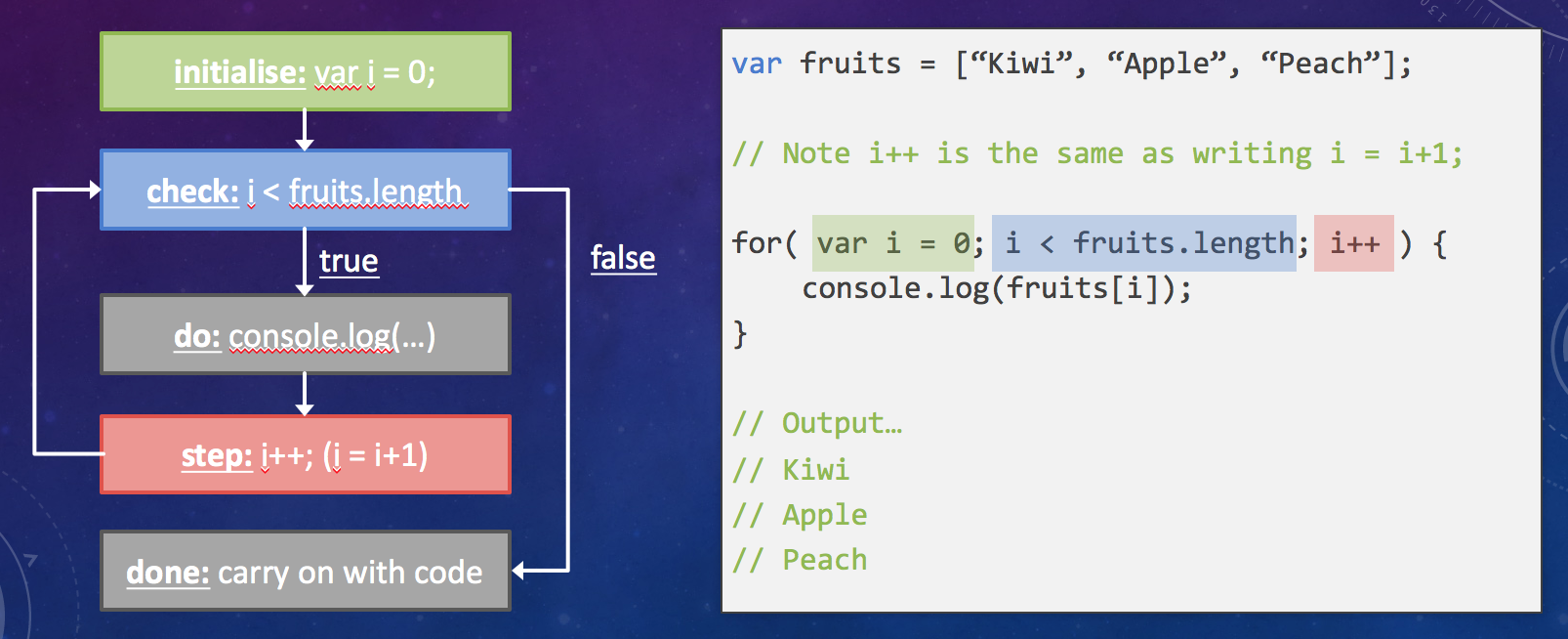
In general, a for loop takes the following format;
for ([initialExpression]; [condition]; [incrementExpression]) {
    statement_1
    statement_2
    ...
}