Animated Explosions
- medium
- Game Development
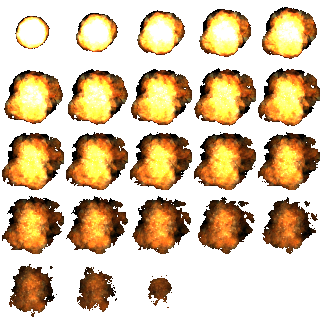
When you destroy an aseteroid, it would be cool to show an animated explosion effect. This is usually done using “Spritesheet animation”, which is a bit like “flip-book” animation. You provide an image which is broken down into a number of squares and Phaser is able to play one after the other to form an animation.
Task Definition
When an asteroid is destroyed, you should play a sprite-sheet animation to make it look like an explosion has occured.
Hints
You should check the following Phaser Example for how to load sprite sheets into the game!
You can download an explosion sprite sheet below (right click and save as).
Note. Each frame in the animation below is 64x64 pixels. You will need this information when creating your sprite sheet object after destroying an asteroid!