JavaScript: Objects
We know how to make arrays of simple objects, but how would you use that to store the high scores for our game?
You could have 2 arrays side-by-side and keep them in sync (parallel arrays). But… Imagine if you accidentally deleted something from one of the two lists but not the other. Also, the code required to sort this list would be pretty ugly.
What are Objects?

Fortunately, JavaScript has another type of variable known as an ‘Object’ which allows you store multiple properties and values in a single variable without using an array. An object can be thought of as a container of variables - it is a bag containing any number of variables - each with it’s own name and value.
Objects are similar to arrays in some ways, but instead of using a position (index) to access each element, each element of an object has a name (or key). In other programming languages, you maybe have come across similar concepts such as a Dictionary or a HashMap.
The following example shows how you might use an object to represent a single Tweet in a Twitter client;
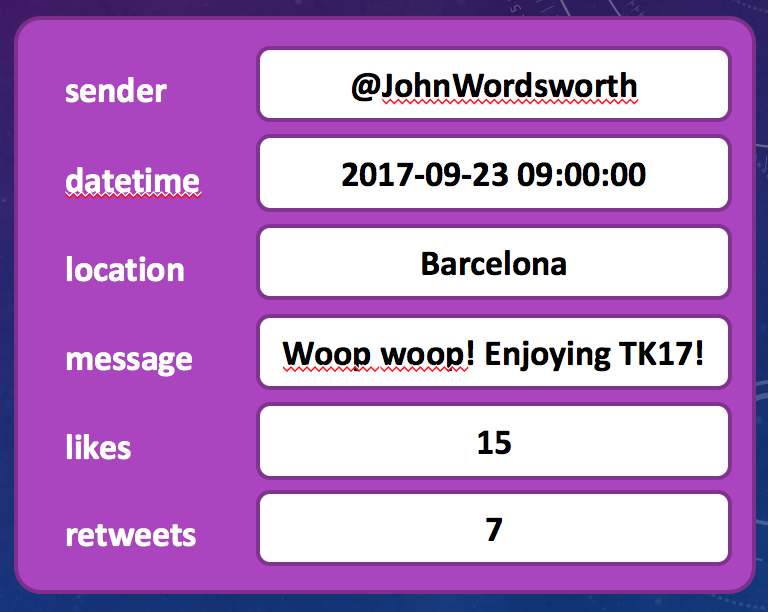
Defining Objects and Accessing Elements
You can initialize an object using curly braces followed by a list of key, value pairs. Each key/value pair adds another item to the object - where each item is basically the same as any other variable in your code (only it is contained within the object).
// Create an object with keys and values
var entry = {
    sender: "@JohnWordsworth",
    datetime: "2017-09-23 09:00:00",
    location: "Barcelona",
    message: "Woop woop! Enjoying TK17!"
}
Once you have created an object, you can access elements in a similar way to how you access items in an array. However, instead of using a position or index to access the elements, you should use the items name.
There are actually two ways that you can access items within an object - using square brackets and a string [“name”] or using a dot ‘.’ followed by the name of the item within the object you want to access…
// Print out some items in the object created above
console.log( entry.sender );
console.log( entry["location"] );

// You can add or update values using either of these two methods too.
entry.retweets = 7;
entry["likes"] = 15;
Another Example
var entry = {
    name: "Alex",
    score: 1000
}

entry["score"] = 800;
entry.score = 900;

console.log(entry);             // Prints "[object Object]"
console.log(entry["name"]);     // Prints "Alex"
console.log(entry.name);        // Prints "Alex"
console.log(entry.score);       // Prints 800
console.log(entry.asdf);        // Prints undefined (but not an error)
Objects in Arrays
Objects are just another type of variable. As such, you can store objects in an array just like strings. For our Twitter Client example above, this means that we can have an array containing information about dozens (or hundreds) of tweets, where each Tweet is an object as shown above.
Consider the example of a score board in a video game. For a high score table, we want to associate a name and a score with each position on the score board. For this example, we might want our data to look something like this;
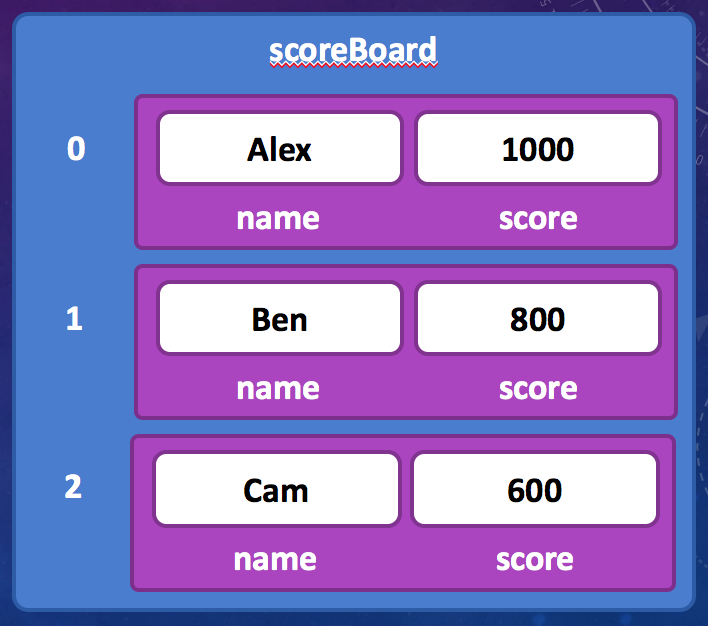
We could do that with the following code;
// Create an array which contains 3 objects
// Each object has a name and score property representing an entry on the score board.
var scoreBoard = [
    { name: "Alex",  score: 1000 },
    { name: "Ben",   score: 800 },
    { name: "Cam",   score: 600 },
];
You could add an additonal entry to the array later, just like any other array…
var entry = { name: "Danny", score: 400 };
scoreBoard.push(entry);
Once you have created the score board array, you can do the following operations on it.
console.log( scoreBoard[0].name );          // Prints "Alex"
console.log( scoreBoard[0].score )          // Prints 1000

console.log( scoreBoard[1]["name"] );       // Prints "Ben"
console.log( scoreBoard[2]["name"] );       // Prints 800