JavaScript: Variables
What are Variables?
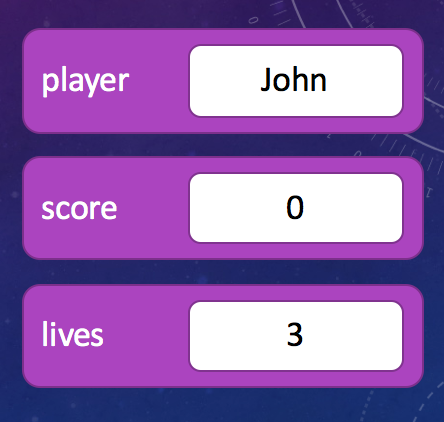
Variables are essentially containers with names that you can use in your program to store values or data for later use. In just 1MB of RAM you can store over 250,000 numbers - imagine trying to use that much data without having names for them!
Variables have both a name and a value and you are able to ‘read’ or ‘write’ the value once you have created the variable.
Some examples of how you might use variables in a video game are;
- playerName: Used to store the player’s name as a string.
- lives: Used to store how many lives the player has left.
- score: Used to store how many points the player has earned.
Defining a Variable
In JavaScript you define a variable with the keyword var. This creates a new variable that you can use nearly anywhere in your code to refer back to the value it contains.
var playerName = "John";        // The variable 'playerName' contains the string "John"
var score = 0;                  // The variable 'score' contains the number 0
Mathematical Operators
You can do basic mathematical operations on variables and numbers in your code, which is not much different from using a graphical calculator. Some basic operators are;
- = (Assignment Operator): Set a variable to the value on the right.
- + (Addition): Add two numbers together.
- - (Subtraction): Subtract one value from another.
- * (Multiplication): Multiply one value with another.
- / (Division): Divide one value by another.
- % (Remainder): Remainder after dividing one value by another.
Examples
var a = 5;
var b = 5;
var c = a + 10;
var d = a + b;

console.log(4+3);       // Prints 7
console.log(9-3);       // Prints 6
console.log(19%10);     // Prints 9
console.log(c);         // Prints 15
console.log(d);         // Prints 10

var answer = (10 * (3 + 2));
console.log(answer);        // Prints 50
JavaScript Variable Types
In JavaScript, there are 6 types of data that you can store in a variable. Five of them are known as ‘primitive’ types, and they are basic types of data which fits one of the following types;
- Number: A number is exactly what it sounds like - it can be an integer / whole number (6) or a floating point number (44.5).
- String: A string is a collection of letters and characters, like “Hello World!”.
- Boolean: A boolean can be either ‘true’ or ‘false’. Like a light switch - it is either on or off, but nothing else.
- Null: ‘null’ is a special value that is generally used to say that something doesn’t exist. For instance, you might run an algorithm on high scores to get the highest, but if there are no scores yet you might get ‘null’ back to state that you’ve got no data.
- Undefined: Undefined is another special value that is usually used to state that, even though you expected to get a value, you didn’t get anything. Where null specifically states ‘there was no object matching your query’, Undefined simply states ‘you didn’t give me any data to work on’.
var a = 33.5;       // Variable a is set to the number 33.5.
var b = "Hello";    // Variable b is set to the strong "Hello".
var c = false;      // Variable c is set to the boolean 'false'.
var d = null;       // Variable d is set to the 'null' value.
var e;          // You haven't specified what 'e' is, so it is undefined.
Last but not least, you can also create objects too. However, custom objects are always just a collection of primitive types at the end of the day, sometimes combined with ‘functions’ that allow you to run pre-defined code on them. Examples of objects are arrays - which might be a list of a 100 numbers, or a “racing car” in a video game - which might be a complicated set of properties and functions for moving around the world.
String Concatenation
While most mathematical operations don’t work on string variables, there is a special case that’s incredibly useful. If you use the plus symbol (+) then you can join two strings together. This is called concatenation.
What’s also quite neat, is that if you have a string variable on the left hand side - you can also “add” numbers, booleans or any other type of variable. Because the first value is a string, JavaScript knows to convert the other values to a string before concatenating them together into one big string.
Examples
var name = "John";
var score = 100;
var isWinner = true;

console.log("Hello " + name);
console.log("Highest Score: " + score);
console.log("Is Winner? " + isWinner);

var message = name + ": " + score;
console.log(message);

// Prints "John: 100"
Side Note
Strings and many other variables have ‘additional information’ hidden inside of them. These are known as properties of that variable. For instance, you can access the length of a string by typing;
var name = "John"
console.log( name.length );
All strings contain the property “length” and it will always tell you how many characers are in the string. Even strings that haven’t been placed into variables have a length;
console.log( "John".length );Constant Variables
Modern versions of JavaScript also made it possible to create constant variables. Constants are variables that you initialize with a value and then can never change.
While this might sound pointless, it’s actually very useful. Most apps and games have some pre-defined variables that you might need to use in a few places of your code - such as what the web-address is for a specific web-site that you need to interact with or how many lives the player should start the game with.
// Constants used for calculating the cost of a cycle / bike order.
const frameCost = 6000;
const wheelCost = 700;

// Use the constants several times
var orderOne = frameCost + (2 * wheelCost);
var orderTwo = (4 * wheelCost);

var totalCost = orderOne + orderTwo;

frameCost = 5000;       // Error!
Side Note: Dynamic Typing
Generally speaking, there are 2 types of programming languages. Some programming languages (static languages) are super strict and require you to say what variables you want before you use them and what type of thing they will hold. In those languages, if you try to store a text string when you declared the variable to hold a number - your application will run into problems.
Fortunately, JavaScript is what’s known as a ‘loosely typed’ or ‘dynamic’ language. This means that you can declare a variable right when you start using it and you don’t have to say upfront what type of data will be stored in that variable. Infact, in JavaScript - you can even change what type of thing is inside a variable as you go along.
var foo = 33.5;     // foo is now set to the number 33.5.
var foo = "Hello";  // foo is now a string containing "Hello".
var foo = true;     // foo is now a boolean containing 'true'.
Advanced Topic
It might sound like a lot of extra work to declare all of your variables up front and you might be wondering why some languages make you do so. Well, the short answer is that by defining a fixed type for a variable you can do extra checks to reduce errors in your code. In JavaScript, if you have some code that adds two numbers togeter, but one variable is actually a string instead - things could go horribly wrong. There are other implications too - loosely typed languages are generally a little bit slower too. You trade off coding convenience with a small bit of performance.